
Great news for the community! The integration of QML Quick Editor into Qt Creator is now 100% complete. The plugin is officially available, bringing native workflow integration directly to your development environment. Give it a try, and let us know what you think!
Features:
Designed as an all-in-one QML code editor, this extension allows you to quickly prototype and test QML snippets without the overhead of creating a full project. Simply edit your code and preview the visual output instantly inside Qt Creator—speeding up your UI experimentation and debugging workflow.
- QML editor
- QML runner
- Display logs
- Embedded examples: Animation, Layouts, Games, Images, Model, Various, Shaders views.
How to install
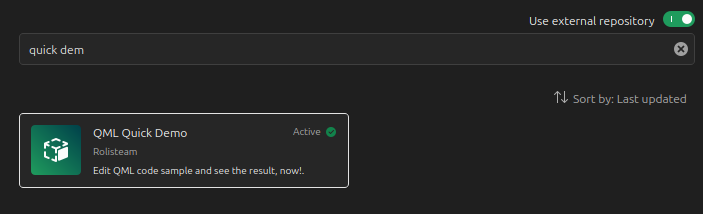
- Make sure Use external repository is checked
- Search for quick demo
- Click on the right extension
- Click on the install button (You must have QtCreater 20.0.2)
How to open it
Easy! When the plugin is installed, just got to Tools menu.
Then, go to QMLQuickDemo, finally click on the menu item: Show Quick Tester.
In short: Tools > QMLQuickDemo > Show Quick Tester
(or click on Meta+Ctrl+Alt+A)
Demos
## More details: